Orders · Kitchen · Delivery · Reports
Run Restaurant Operations from One Hub
Track every stage of your restaurant operation from a single panel — from order to prep, delivery to daily performance. Stay in control during peak hours with a more orderly flow.
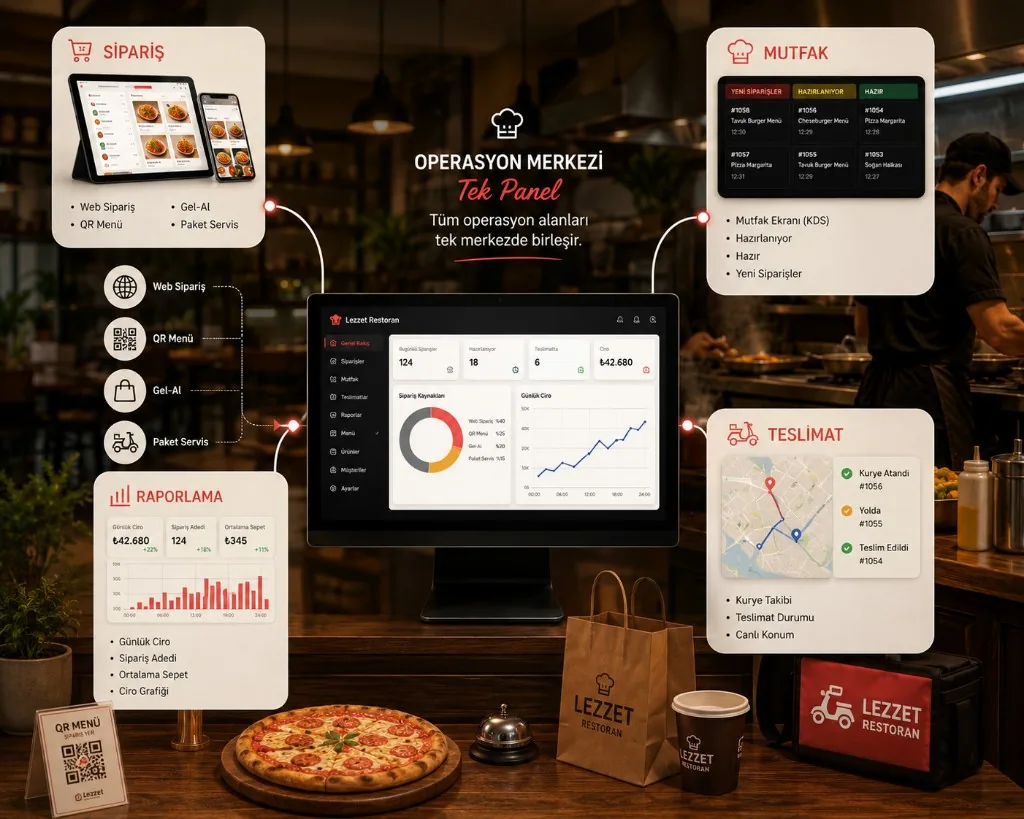
Why central management?
As Orders Grow, Operations Need Control
In a restaurant’s daily operations, multi-channel orders, kitchen prep, deliveries and team coordination all move at once.
Instead of tracking each process in a different place, seeing operations in one flow helps managers understand what is happening, what is waiting and where volume builds up.
Scattered setup
- Web Separate screen
- QR Separate screen
- Phone Separate screen
- Delivery Separate screen
- Pickup Separate screen
One Operations Hub
- Kitchen
- Delivery
- Management
- Reporting
End-to-end flow
What Happens When an Order Arrives?
Every order follows a clear operations path from the moment a guest places it to the moment it is delivered.
-
01
Order
-
02
Confirm
The order reaches the business and is taken into processing.
-
03
Prep
The kitchen queues the order for preparation.
-
04
Ready
The order is ready for delivery or pickup.
-
05
Deliver
The order is delivered to the guest or handed over for pickup.
-
06
Record
Completed work appears in reports.
Peak-hour control
See Where You Stand When Volume Spikes
The most critical moment in restaurant operations is when orders pile up at once. What matters then is not more screens — it is clearly seeing which stage each order is in.
Track waiting, preparing, ready and completed orders from the operations panel to manage team workload more easily. Related: peak-hour kitchen flow.
Team coordination
Every Team in the Same Flow
Kitchen prep, handoff to delivery and manager oversight do not move independently. See also the kitchen display.
Each team sees its own stage while overall operations stay visible from the center.
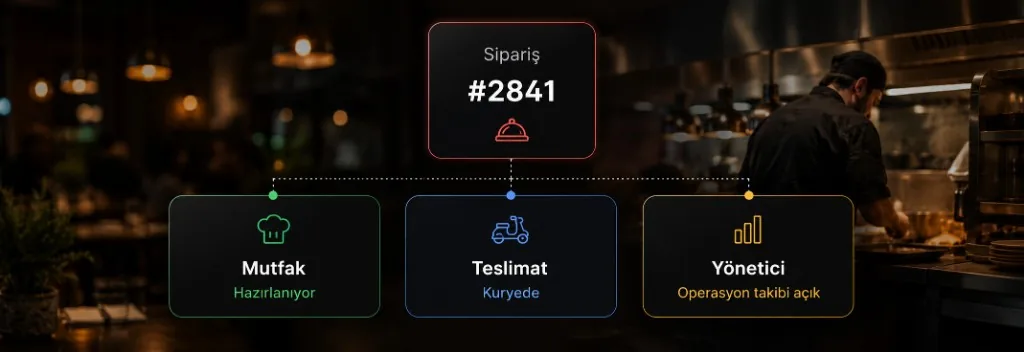
Operations visibility
See the Operation — Not Just the Order
Operations management is not only about finishing orders; it is about seeing where time is lost and which processes can improve. Details: sales reports and analytics.
Peak Hours
When does order volume spike?
Prep Time
How long do orders take to prepare?
Cancellations
At which stages do cancellations happen?
Channel Mix
Which channels do orders come from?
Business impact
Less Chaos, More Controlled Operations
Orders do not get lost
Work from different channels stays visible in one operations flow.
Teams know what to do
Everyone can see which stage an order is in.
Volume is spotted earlier
Order volume and prep processes can be tracked.
Decisions are data-led
Daily outcomes can be followed with reports.
Scattered operations
- Separate screens
- Phones
- Notes
Central operations
- One flow
- Visible status
- Measurable outcomes
Core areas
One System, Different Operations Areas
Scalability
Manage Multiple Branches with the Same Logic
As branch count grows, tracking each location’s daily operations separately gets harder.
With a central approach you can follow branch operations data in one structure and see overall performance plus branch-level differences. Solution: multi-branch restaurant management.
- Branch 01
- Branch 02
- Branch 03
- Branch 04
Continuous improvement
A Better Flow Than Yesterday
-
1
Track the data
See volume, prep and cancellation points.
-
2
Find the weak stage
Locate where delays form.
-
3
Adjust operations
Replan team and process distribution accordingly.
-
4
Measure the result
Follow the impact of the change on operations.
- Measure
- See
- Adjust
- Apply
- Measure again
FAQ
About Restaurant Operations Management
What does restaurant operations management cover?
Are ordering systems and operations management the same?
Does it help during peak hours?
Can multi-branch restaurants use it?
Bring Your Restaurant Operations into One Flow
Start running daily operations with more control — from order to kitchen, delivery to reporting.
Explore in detail: kitchen display · delivery · POS integrations · setup